Your AI coding assistant can now tag commits to GoalPath items
The PR no one remembers
You merge a PR on Friday afternoon. Monday morning, someone in the team chat asks "did the auth redirect fix go out last week?" You scroll through the merged PRs, click into the right one, copy the commit subject into the GoalPath item comment, paste a link, hit send. Five minutes gone, twice a week, every developer on the team.
This is the kind of small ritual that nobody notices is expensive until you add it up. Two minutes here, three minutes there. Multiply by every item, every week, every team. The gap between "the work shipped" and "the activity timeline knows the work shipped" is where status updates go to die.
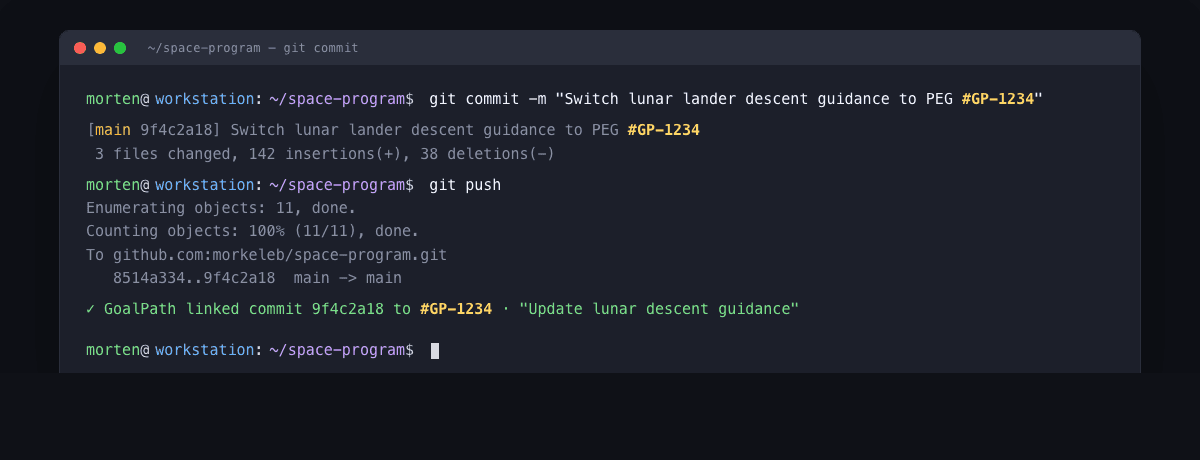
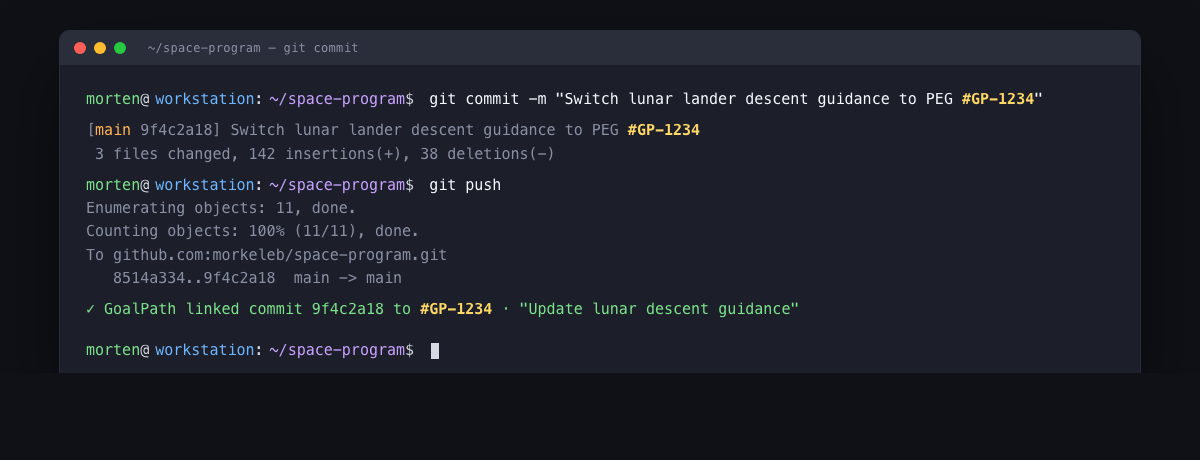
GoalPath has had a GitHub commit linking integration since April. Tag a commit with #GP-47 (or #GP47, both work, case insensitive) and the integration files it under that item's activity timeline within seconds. Branch names like feature/GP-47-auth-redirect work too. PR titles work too. The plumbing has been there for weeks.
But the link rate has been embarrassingly low. The reason was simple: the AI coding assistants writing most of those commits had no idea the convention existed.
This week we shipped four small updates that close that gap. None of them changed the parser or the integration itself. All of them changed where the convention is documented so AI assistants actually see it.
What changed
Four things, none of them dramatic on their own. Together they make the AI assistant a useful collaborator instead of a forgetful one.
The CLI gained enum schemas on its MCP tools. When your AI assistant calls a GoalPath tool through the Model Context Protocol, it now gets a clear, immediate error if it tries to set an item to "Done" instead of "Finished", or types "blocked" instead of "Blocked". Before, the call sailed through validation and failed somewhere downstream with a less actionable message. The valid values are now part of the schema the AI sees, so most typos never happen in the first place.
The CLI surfaces the item's short number in MCP responses. When the AI creates an item, lists items, or searches items, the response now includes the #GP-N short number directly. Before, the AI had to call get_item after creating something just to read the number. One less round trip, and the number is right there next to the title where the AI is already looking.
The goalpath mcp init command grew an instruction file flow. Run goalpath mcp init in any project and it now detects whether you have a CLAUDE.md, AGENTS.md, .cursorrules, or .github/copilot-instructions.md. If you do, it offers to append a small section explaining the #GP-N commit tagging convention. The block is wrapped in HTML comment markers so re-running the command updates it in place. No duplication, no clobbering your content.
The skills plugin got a version bump. The goalpath-skills plugin had been teaching the convention since April, but the version field never moved past 1.0.0. The plugin loader caches by version, so installed copies never refreshed. Bumping to 1.0.1 forces every installed copy to pull the current content the next time the user reinstalls. A small fix with outsized consequences for everyone running the skills today.
How to update
If you are running the GoalPath CLI locally as your MCP server (goalpath mcp serve is in your .mcp.json), pull the latest:
npm install -g @goalpath/cli@latestThe new version is 1.1.0. Restart your AI assistant after installing so the tool schemas are reloaded.
For the skills plugin in Claude Code:
/plugin update goalpath-skillsOr reinstall it from the marketplace. The version you want is 1.0.1 or newer.
If you already have a project with an instruction file (CLAUDE.md, AGENTS.md, .cursorrules, or .github/copilot-instructions.md), this is a good time to run:
cd /path/to/your/project
goalpath mcp init
It will detect the file and offer to append the #GP-N section. Pick yes, commit the change, and every developer (and every AI assistant) on the team gets the convention for free.
Why this matters
The deeper point is not really about commit linking. It is about what an AI coding assistant needs to be a useful collaborator on a real product team.
Without context, an AI is a confident stranger. It writes code that compiles, but it has no idea which item the code belongs to, which status transitions are valid, or whether the change you just asked for is the highest priority work today. So the human has to be the bridge: paste an item ID into the prompt, copy the AI's output back into the GoalPath comment, manually update the status. The AI is helpful in narrow ways, but the team's process still runs on a parallel track in the human's head.
The MCP server changes that. The AI gets direct, scoped access to GoalPath through proper auth boundaries. It can read what you are working on, write status updates, post comments with PR links, and now tag the commits it writes so the activity timeline reflects what actually shipped. The team's process becomes the AI's process, not the human's.
The skills package the workflow on top of that. /goalpath-discover turns a half-formed idea into a written PRD. /goalpath-plan breaks that PRD into items with estimates. /goalpath-implement ships the entire milestone on a single branch with one PR. /goalpath-work drives a single item from start to finish. /goalpath-status tells you what is on your plate right now and what to pick up next. The slash commands are short, the structure is consistent, and the AI follows the same path every time.
This is the pattern across every GoalPath integration. The Chrome extension captures bugs from the browser. The VS Code extension puts your task list in the editor sidebar. The CLI runs the MCP server locally so your AI assistant has direct access. The link rate today sits around 2.5 percent, and it should climb steadily now that the convention reaches every AI client through the channels they actually read. We will know it is working when "did that ship?" stops appearing in the team chat.
Try it
Update both packages, run goalpath mcp init in your project, and watch your next AI-written commit show up under the right item without anyone copying anything anywhere.
Install the GoalPath CLI | Browse the goalpath-skills plugin | Read the integration docs
Ready to plan your roadmap with data?
Create an account on GoalPath and start tracking velocity, forecasting milestones, and delivering predictably.
Create an Account