Understanding cycle time: the metric that actually predicts delivery
Why your delivery estimates keep being wrong
Someone asks when a feature will ship. You do a quick mental calculation: sprint ends Friday, a couple items are in review, maybe next week. You say "end of next week" with reasonable confidence. Two weeks later it is still not done, and you are back in that conversation.
This is not a planning failure. It is a measurement failure. The number you gave was based on a guess dressed up as an estimate. The actual data was sitting in your project history the whole time, but nobody had surfaced it in a useful form.
There are three distinct time measurements that matter in software delivery. Most teams confuse them or use them interchangeably. Once you understand the difference, you can give stakeholders an answer that actually holds.
Lead time, cycle time, wait time: not the same thing
Lead time is the total clock time from when a piece of work enters your system to when it ships. It starts when someone creates the item and ends when it is accepted. From a customer or stakeholder perspective, this is the number that matters. It answers "how long does it take to get something done around here?"
Cycle time is the narrower slice: the time from when your team actually starts work on an item to when it is done. The cycle time clock begins the moment someone moves it out of NotStarted (whatever that first active status is). This is the number your team can most directly influence.
Wait time is the remainder. Lead time minus cycle time. It is all the time an item sat in someone's queue before anyone touched it: the days it spent in the backlog, waiting for review, blocked on a dependency.
The relationship is simple: lead time = cycle time + wait time.
Why does the distinction matter? Because they have completely different causes and different fixes.
If your cycle time is high, something about how your team actually executes is slow. Too many items in progress at once, unclear requirements at the start, slow code review, complex work that was underestimated.
If your wait time is high, the work is fine once someone picks it up. It is just not getting picked up. The backlog is too deep, items sit unassigned, reviews take days because the reviewer is juggling five other things.
Most teams trying to "improve velocity" attack cycle time when their real problem is wait time, or vice versa. They run faster at the wrong part of the system. That is why separating the two is not just an academic exercise.
The average will mislead you
Here is a trap most teams fall into: they look at average cycle time. Their average is five days, so they promise delivery in a week. Then 30% of items take twelve days, and the promise is broken.
Averages are pulled by outliers. One item that gets stuck for three weeks drags the average up, but most items finish in four days. Using the average to make promises is optimistic about the typical case and still wrong about the edge cases.
A better approach: instead of the average, look at the number that 85% of your items actually finish within. GoalPath calculates this automatically. If that number is nine days, you can tell a stakeholder that nine out of ten items will be done within nine days of starting. That is a commitment you can actually keep, because it accounts for the realistic spread of your work instead of pretending everything takes the average.
A 12-person engineering team at Siemens Health Services had an 85th-percentile cycle time of 62 days. After introducing explicit WIP limits, it dropped to 36 days, a 42% improvement with no change in team size. Measuring cycle time percentiles gave them the evidence to act on a problem they already suspected but could not quantify. (Source: Agile Alliance case study)
Most teams are surprised by their flow efficiency
Flow efficiency is the ratio of cycle time to lead time, expressed as a percentage. If the average lead time for your items is 10 days and the average cycle time is 2 days, your flow efficiency is 20%.
Most software teams land between 15% and 25% when they first measure this. (Source: Kanban University) That means work is actively being worked on for roughly one day out of five. The other four days it is sitting in a queue somewhere.
Teams that have not measured this before tend to be surprised. They thought their process was fairly lean. The data says otherwise.
High-performing teams push this toward 40% and above. That does not mean everyone is coding all the time. Some waiting is inherent and even valuable (code review, QA). But it does mean you understand where the wait is happening and you have made a deliberate choice about it rather than having it accumulate invisibly.
How GoalPath shows this to you
On the Velocity Analytics page, the Flow Time card shows lead time, cycle time, and wait time together, covering the last 12 weeks of completed items. It leads with the lead time median because that is what stakeholders experience. Directly below it, cycle time and wait time show you the split: where your process is healthy and where it is not.
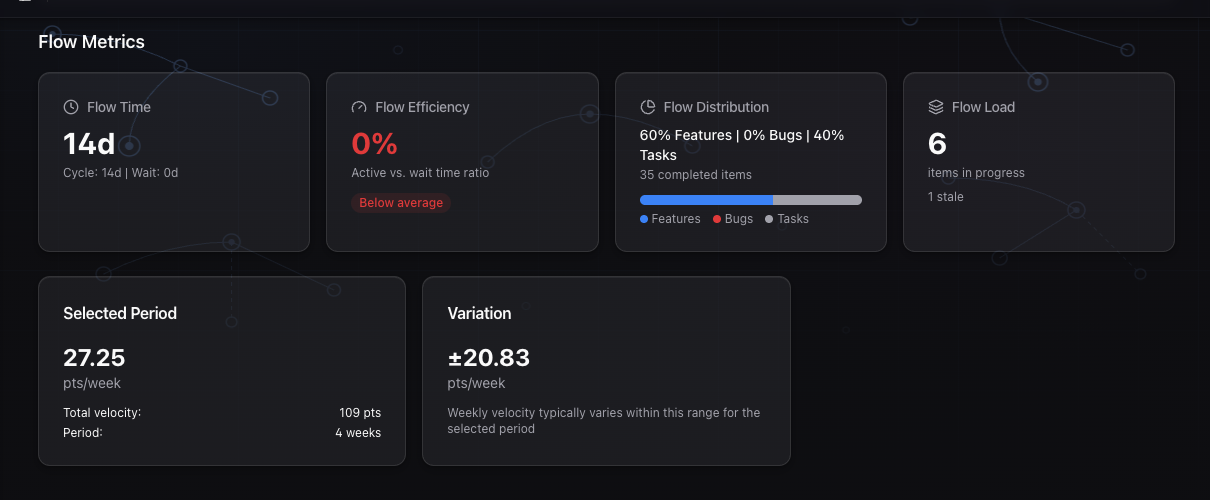
The trend badge compares average lead time across two 12-week windows, so you know if your changes are moving things in the right direction. Next to it, the Flow Efficiency card shows your efficiency percentage with a benchmark label (below average, average, above average, or excellent) so you can calibrate against what other teams achieve.
The ritual GoalPath replaces
Before a team has this data, cycle time conversation tends to happen one of two ways.
The first is the "where are we?" sync. A stakeholder asks for a status update, someone pulls together a rough summary based on memory, and you have a 30-minute meeting where the real answer is "probably next week, we think." This happens every time someone needs a delivery estimate. The PM becomes a real-time translator between the work and the question.
The second is the end-of-sprint retrospective number. Teams record their velocity, maybe track some story points, and call it a day. Nobody breaks down whether the time went into active work or into waiting. Nobody has a number they can quote with confidence.
GoalPath eliminates both by turning the execution data your team already produces into metrics that answer the question directly. When someone asks "when will this ship?", you open the Velocity Analytics page, check the cycle time median and trend on the Flow Time card, and give an honest number grounded in your team's actual history. No meeting. No mental arithmetic. No optimism disguised as a forecast.
The mechanism: GoalPath captures when each item is created, when work begins on it (when it moves out of NotStarted), and when it is completed (set to Accepted). Those three timestamps are all GoalPath needs to compute lead time, cycle time, and wait time. Because the workflow is structured, with teams moving items through defined statuses rather than typing status into a free-text field, the timestamps are consistent and reliable by default.
What to do with a high wait time
If you look at your Flow Time breakdown and see that cycle time is three days but lead time is twelve days, your wait time is nine days. The team is not slow. The queue is.
The most common causes:
Backlog depth. Items sit unstarted for days because there are thirty items in the backlog and the team picks up new work in the order it was created rather than by priority. Fixing this means being more deliberate about what goes into the active sprint or milestone, so fewer items sit untouched.
Slow handoffs. An item finishes development and waits three days for QA. Or code review happens in batches on Fridays. The work is done but it has not moved. Making handoffs explicit and time-boxed (a 24-hour review SLA, for instance) attacks this directly.
WIP accumulation. When everyone has four or five items in progress simultaneously, everything moves slowly. Items that have already been started sit in review queues while the developer has moved on to the next thing. Reducing active WIP is often the fastest way to shrink wait time, not because people work faster, but because there is less work waiting for attention at each handoff.
GoalPath's Flow Load card shows you current WIP and aging: how many items are fresh (under 3 days), normal, aging, stale, or stuck (over 30 days). If you see a lot in the stale and stuck categories, your wait time problem has a name.
What to do with a high cycle time
If cycle time is high but wait time is low (work gets picked up quickly but takes a long time to finish), the problem is different.
Look at item size. Large items that take two weeks each will have high cycle time almost by definition. Breaking items into smaller increments (under three days of active work) will reduce the median and tighten the distribution.
Look at rework. In GoalPath, items that fail review get set to Rejected and need to be restarted. If you see a pattern of items cycling through Rejected and back to Started, the active work time is being inflated by revision cycles. This usually points to requirements clarity at the start, not execution speed.
Look at context switching. A developer working on five items simultaneously is not doing five days of focused work on each. They are doing one day here, two days there, interrupted by a higher priority. The actual cycle time is long not because the work is hard but because the clock is running while the item waits for attention from its own owner.
The 85th percentile is the most useful number here. If the median is four days but 85% of items finish within fourteen days, you have a small number of items that are taking much longer than typical. Find the pattern in those outliers. They usually have something in common.
Trend indicators tell you if your changes are working
One of the harder parts of process improvement is knowing whether what you changed made a difference or whether the numbers moved because of randomness.
GoalPath compares your current 12-week window to the previous 12-week window and shows whether lead time is improving, stable, or worsening, along with the percentage change. This is the trend badge on the Flow Time card.
If you reduce WIP limits and three weeks later you see the trend badge flip to "Improving 18%", that is signal. You have a number attached to the change. If it stays stable or moves to "Worsening", you have information too: either the change did not work or something else is counteracting it.
Without this comparison, teams guess at whether their process changes are working. With it, you have a 24-week view of the direction your delivery speed is moving.
The short version
Cycle time is how long items take once your team starts them. Lead time is how long they take from creation to done. Wait time is the difference: the invisible queue time that most teams never measure.
The median cycle time is what you quote to stakeholders for a realistic delivery estimate. The 85th percentile gives you a safer number that accounts for the realistic spread of your work.
GoalPath computes all three metrics automatically from your workflow timestamps, shows you the trend, and benchmarks your flow efficiency against industry data. You do not need a separate analytics tool or a Friday afternoon ritual to produce this information. It is on the Velocity Analytics page, updated daily.
The "where are we?" ping from your stakeholder is a symptom of not having this data visible and current. Once you do, the question mostly answers itself.
Further reading
- ProKanban: Signalling Work-in-Progress with Cycle Time Percentiles: why the 85th percentile is the right number for delivery commitments
- Scrum.org: Getting to 85 (Agile Metrics): the case for percentile-based forecasting over averages
- Kanban University: Flow Efficiency: why 15-25% is typical and how to improve it
- DORA 2025 Report: software delivery performance benchmarks across thousands of teams
Ready to plan your roadmap with data?
Create an account on GoalPath and start tracking velocity, forecasting milestones, and delivering predictably.
Create an Account